
Last updated on
Oct 31, 2026

India CitiBank Account Closure Request Form 2014-2026 free printable template
We are not affiliated with any brand or entity on this form

Fill out
Complete the form online in a simple drag-and-drop editor.

eSign
Add your legally binding signature or send the form for signing.

Share
Share the form via a link, letting anyone fill it out from any device.

Export
Download, print, email, or move the form to your cloud storage.
Why pdfFiller is the best tool for your documents and forms


End-to-end document management
From editing and signing to collaboration and tracking, pdfFiller has everything you need to get your documents done quickly and efficiently.
Accessible from anywhere
pdfFiller is fully cloud-based. This means you can edit, sign, and share documents from anywhere using your computer, smartphone, or tablet.
Secure and compliant
pdfFiller lets you securely manage documents following global laws like ESIGN, CCPA, and GDPR. It's also HIPAA and SOC 2 compliant.
What is India CitiBank Account Closure Request Form
The Account Closure Request Form is a document used by account holders to formally request the closure of their bank account.
pdfFiller scores top ratings on review platforms




Easy to use
Easy to use software with albeit a small learning curve. Overall satisfied!
Realy useful! :-)
Really good
excellent experience using the PDFfiller it does everything what i need it to do
steep learning curve but the formulas seem to work , so yay!
Who needs India CitiBank Account Closure Request Form?
Explore how professionals across industries use pdfFiller.

India CitiBank Account Closure Request Form is needed by:
-
Account holders looking to close their bank account.
-
Individuals needing to manage bank account services.
-
Business owners who wish to dissolve their business bank accounts.
-
Trusted individuals appointed by account holders to facilitate closure.
-
Financial advisors assisting clients with account transitions.
Comprehensive Guide to India CitiBank Account Closure Request Form
What is the Account Closure Request Form?
The Account Closure Request Form serves as an essential tool for individuals wishing to officially close their bank accounts. This form plays a significant role in effective financial management by providing a structured way to document the closure process. Key mandatory fields include the account number and a designated closure purpose, ensuring clarity and accuracy in the request.
Purpose and Benefits of the Account Closure Request Form
People may require the Account Closure Request Form for various reasons. It streamlines the process of closing bank accounts, which can often be complex and time-consuming. Additionally, using this form guarantees proper documentation of the account closure, thus protecting the user’s financial interests. It also aids in the efficient retrieval of any remaining balance in the account, which is crucial for a smooth transition.
Who Needs the Account Closure Request Form?
This form is beneficial for various groups of people. It is primarily aimed at individuals who are looking to close personal or joint bank accounts. Customers of banks like Citibank, along with those with linked accounts needing simultaneous closures, also fall into this category. Understanding who needs this form can help ensure that it is used by all individuals seeking to manage their financial affairs responsibly.
How to Fill Out the Account Closure Request Form Online
Completing the Account Closure Request Form online can save users significant time. Here are steps to guide you through the process:
-
Access the form on the bank’s website or a trusted PDF editor.
-
Begin by entering your personal information, including the account number.
-
Select the reason for closure from the provided options.
-
Review the key sections, ensuring all boxes are checked as applicable.
-
Double-check all entered information for accuracy before signing.
Taking care with each of these steps can help minimize errors and ensure a proper submission.
Common Errors and How to Avoid Them
When filling out the Account Closure Request Form, certain mistakes frequently occur. Common errors include missing signature fields and inaccurate account numbers. To avoid these pitfalls, it's essential to double-check the information before finalizing the form. Verifying signature compliance is equally vital, as it is a critical part of the form's validity.
Submission Methods for the Account Closure Request Form
Once you've completed the Account Closure Request Form, you have multiple submission options available to you:
-
Online submission through the bank's secure portal.
-
In-person delivery at your local bank branch.
-
Mailing the form directly to the appropriate bank address.
Choosing the recommended submission method can expedite the processing of your request, and be mindful of any important deadlines for submission to ensure timely account closure.
What Happens After You Submit the Account Closure Request Form
After submitting the Account Closure Request Form, several key processes take place. Users can expect varying processing times depending on the bank, and they will receive confirmations regarding the status of their submissions. Tracking the submission status may also be possible through the bank’s online services. It's important to know what to expect in terms of receiving a final confirmation of account closure.
Examples of a Completed Account Closure Request Form
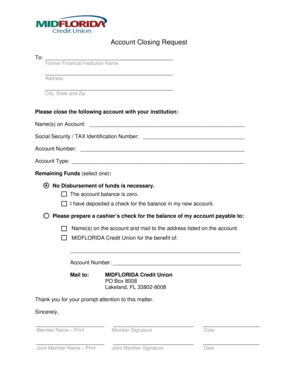
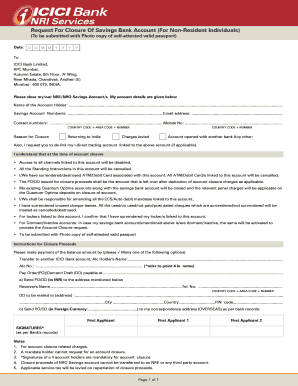
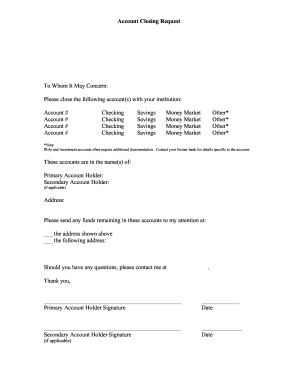
To assist users in understanding how to properly complete the form, examples of filled forms can be invaluable. A sample completed form can showcase the required information clearly, highlighting key sections and correctly filled fields. By examining these examples, users can gain insight into the nuances of filling out the form accurately.
How pdfFiller Can Help with Your Account Closure Request Form
Utilizing pdfFiller for your Account Closure Request Form can significantly enhance the experience of form filling. With features allowing users to edit, sign, and securely manage the form, pdfFiller ensures that sensitive information remains well protected through top-notch security measures. The platform has gained trust among users, making it a reliable option for handling sensitive documents.
Your Next Steps with the Account Closure Request Form
Once you’re ready to proceed with your account closure, consider using pdfFiller to complete your form effortlessly. By leveraging its capabilities, you can ensure a optimal experience while entering your information securely. Explore additional resources and services within pdfFiller to streamline your documentation processes further and prioritize security during your transactions.
How to fill out the India CitiBank Account Closure Request Form
-
1.To access the Account Closure Request Form on pdfFiller, start by visiting the pdfFiller website and using the search function to locate the form by its name.
-
2.Once you've found the form, click to open it in the pdfFiller editor interface where you will see the form fields displayed clearly.
-
3.Before completing the form, gather the necessary information, including your account number, type of account, reason for closure, and your preferred method for receiving the remaining balance.
-
4.Begin filling out the form by clicking on each field; pdfFiller will allow you to enter text directly or check boxes as needed. Ensure all required fields are completed accurately.
-
5.After entering your information, take a moment to review your entries for any mistakes or omissions. Make sure that all details align with what’s needed for the closure.
-
6.Once satisfied with your submission, proceed to finalize the document by clicking on any 'Finish' or 'Submit' buttons available in the interface.
-
7.Finally, save your completed form to your device or utilize the download function on pdfFiller to obtain a PDF version of the form for your records. You can also submit directly through the platform if provided.

Who is eligible to fill out the Account Closure Request Form?
Eligibility to fill out the Account Closure Request Form is typically limited to the account holder or a designated individual authorized by the account holder.
What is the deadline for submitting the Account Closure Request Form?
Submission deadlines can vary depending on the bank's policies. It's advisable to submit the form promptly to ensure timely processing of your account closure.
What methods can I use to submit the form?
You can submit the Account Closure Request Form in person at your bank branch or via electronic submission if your bank supports online processes.
Are any supporting documents required with this form?
Typically, you may need to provide identification details and any account-related documentation, such as a recent bank statement, alongside the form for processing.
What are common mistakes to avoid when filling out this form?
Common mistakes include not signing the form, omitting required information, and providing incorrect account numbers. Double-checking each section before submission is crucial.
How long does it take to process the account closure?
Processing times can vary by bank, but account closures are often processed within a few days to several weeks depending on their policies and current workload.
Can multiple accounts be closed using a single form?
Generally, a single Account Closure Request Form is designed for one account only. If you wish to close multiple accounts, you may need to submit separate forms for each account.
Related Forms



Related Catalogs
Get the latest insights from our blog


If you believe that this page should be taken down, please follow our DMCA take down process
here
.
This form may include fields for payment information. Data entered in these fields is not covered by PCI DSS compliance.